Play with gravity like in “Hop Hop Hop Underwater” game. HTML5 prototype powered by Phaser and Arcade physics
Hop Hop Hop Underwater is a game developed by Ketchapp you can find both on App Store and Google Play.
In the game you control a character which can hop above and under the water.
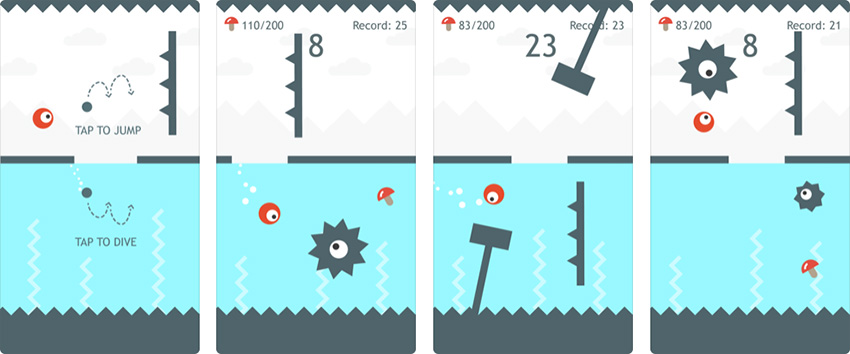
When above the water, you must tap to jump. When underwater, you must tap to dive.
We can build a HTML5 prototype in a few lines using Phaser, this way:
Tap to hop if you’re above the water, or to dive if you are underwater.
In the completely commented source code, you can see it’s just a matter to switch player gravity at the right time, as well as inverting the thrust if we are underwater.
The concept is: jump force must be always against gravity direction, have a look at the source code:
let game;
let gameOptions = {

    // water level, in % of screen height
    waterLevel: 50,

    // ball gravity
    ballGravity: 1600,

    // jump power
    ballPower: 800
}
window.onload = function() {
    let gameConfig = {
        type: Phaser.AUTO,
        backgroundColor:0x888888,
        scale: {
            mode: Phaser.Scale.FIT,
            autoCenter: Phaser.Scale.CENTER_BOTH,
            parent: "thegame",
            width: 750,
            height: 1334
        },
        physics: {
            default: "arcade",
            arcade: {
                gravity: {
                    y: 0
                }
            }
        },
        scene: playGame
    }
    game = new Phaser.Game(gameConfig);
    window.focus();
}
class playGame extends Phaser.Scene{
    constructor(){
        super("PlayGame");
    }
    preload(){
        this.load.image("ball", "ball.png");
        this.load.image("water", "water.png");
    }
    create(){

        // add water sprite
        this.water = this.add.sprite(0, game.config.height / 100 * gameOptions.waterLevel, "water");

        // set registration point to top left pixel
        this.water.setOrigin(0, 0);

        // set display width to cover the entire game width
        this.water.displayWidth = game.config.width;

        // set display height to cover from water level to the bottom of the canvas
        this.water.displayHeight = game.config.height - this.water.y;

        // add ball sprite
        this.ball = this.physics.add.sprite(game.config.width / 2, game.config.height / 4, "ball");

        // set ball ballGravity
        this.ball.body.gravity.y = gameOptions.ballGravity * (this.isUnderwater() ? -1 : 1)

        // listener for input, calls "jump" method
        this.input.on("pointerdown", this.jump, this);
    }

    // method to make ball jump
    jump(){

        // set ball velocity to positive or negative jump speed according to ball position
        this.ball.body.velocity.y = gameOptions.ballPower * (this.isUnderwater() ? 1 : -1);
    }

    // method to check if the ball is underwater
    isUnderwater(){

        // true if ball y position is higher than water level
        return this.ball.y > game.config.height / 100 * gameOptions.waterLevel
    }
    update(){

        // determine next ball gravity
        let nextGravity = gameOptions.ballGravity * (this.isUnderwater() ? -1 : 1);

        // is next ball gravity different than current ball gravity?
        // this means we moved from land to water or from water to land
        if(nextGravity != this.ball.body.gravity.y){

            // set ball ballGravity
            this.ball.body.gravity.y = nextGravity;

            // set ball velocity as if we just jumped
            this.ball.body.velocity.y = gameOptions.ballPower * (this.isUnderwater() ? 1 : -1);
        }
    }
}
I am using Phaser for years, but I always get impressed by how easy is to build hyper casual games with it. Next time we’ll add some enemies, meanwhile download the source code.