Porting a PuzzleScript game to the Commodore 64: Heroes of Sokoban in C with Oscar64
Did you play Heroes of Sokoban?
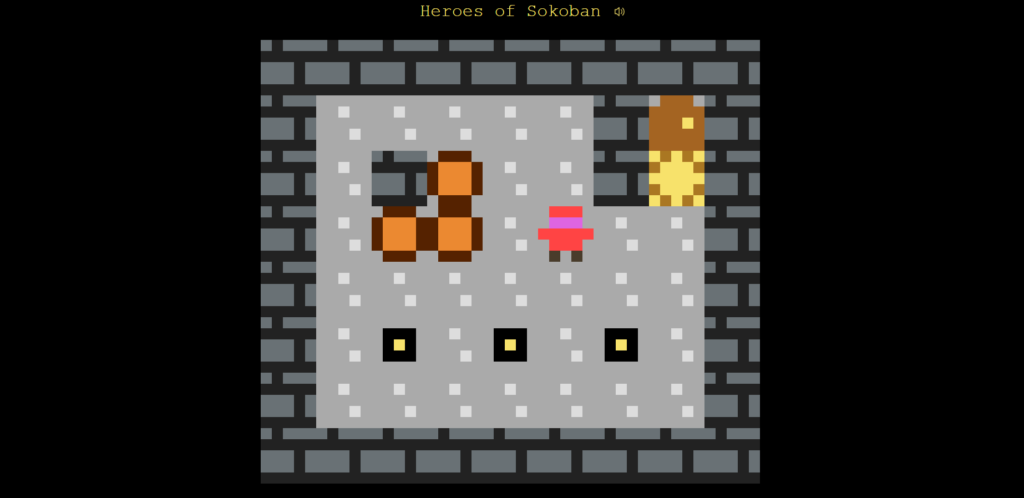
It’s a puzzle game by Jonah Ostroff, made with PuzzleScript, Stephen Lavelle’s engine for turn-based puzzle games played on a grid.
It’s a Sokoban variant with three heroes, and each of them moves crates in a different way.
The fighter pushes crates, even a whole row of them.
The thief pulls the crate behind her as she walks away from it.
The wizard swaps places with the first crate or hero he is facing, however far away.
Only one hero moves at a time, the fire button switches to the next one, and a level is solved when every hero stands on an exit.
You can play the original or read its source on puzzlescript.net.
I ported it to the Commodore 64, writing it in C with the Oscar64 compiler.
The C64 version has all 22 levels and the same rules, plus a level code system the original does not have.
In this post I explain how the port was made: how the rules became C code, how I checked them against the official engine, and how the game fits a machine with 64 KB of RAM and a 1 MHz 6510.
First, check Heroes of Sokoban 64 on my itch.io page and follow me if you didn’t already.
Why I did not write a PuzzleScript engine
A PuzzleScript game is a list of rewrite rules applied to a grid of layered objects, so the obvious way to port one is to write a small PuzzleScript interpreter and feed it the original source.
On a C64 that is the wrong choice.
The interpreter has to match every rule against every cell in every direction, repeat each rule until it stops matching, and keep a movement flag for every object on every layer.
That costs memory I need for graphics and undo, and the time of a turn would grow with the size of the level and the number of rules.
Heroes of Sokoban has a short rule list, so I wrote each rule by hand as plain C.
Every block of code that implements a rule has the original rule quoted in a comment above it, so the two can be compared line by line:
// [ < Thief | Moveable ] -> [ < Thief | < Moveable ]
for (int i = 0; i < gridSize; i++) {
	if (solid[i] == S_THIEF && motion[i] == motionValue && isMoveable(solid[i - step])) {
		motion[i - step] = motionValue;
	}
}I kept the parts of the PuzzleScript turn cycle that decide how the game feels: movements are spread first, objects move later column by column, the six hero switching rules run in the original order, and the doors are late rules applied after the movement.
The result is rules.c, about 500 lines of C with no C64 code in them: the same file compiles with gcc on a PC, which turned out to be very useful.
Project layout
The project is split so that the game logic, the C64 code and the data live in separate files, and changing the levels means touching only one of them.
| File | Contents |
|---|---|
heroes.c | screen, sprites, sound player, input, title page, menu, undo |
rules.c, rules.h | the game rules, with no C64 code in them |
levels.h | the levels as PuzzleScript text, and the level codes |
graphics.h | tiles, heroes, title, sword, torches, colors |
sounds.h | sound effects |
texts.h | every text except the level messages |
boot.asm, boot.prg | the autostart loader |
Only heroes.c goes to the compiler: it includes the headers, and rules.h ends with an Oscar64 pragma that compiles rules.c together with it.
// rules.c is compiled together with the game
#pragma compile("rules.c")Building the game and the disk takes two commands:
oscar64 -n -O2 heroes.c
c1541 -format "heroes,hs" d64 heroes.d64 -write boot.prg heroes -write heroes.prg "heroes main"The first one compiles to heroes.prg, a program that starts with a BASIC SYS line, the second one writes the loader and the game on a disk image.
In VS Code a tasks.json runs the two commands and starts VICE with Ctrl+Shift+B.
The first one compiles to heroes.prg, a program that starts with a BASIC SYS line, the second one writes the loader and the game on a disk image.
In VS Code a tasks.json runs the two commands and starts VICE with Ctrl+Shift+B.
The level state
The levels stay exactly as they are written in the LEVELS section of the PuzzleScript source, one C string per row, so they can be pasted from the original:
// level 3
"Message Hold down switches to open doors.",
"",
"#############",
"#...#...#...#",
"#.F.*.{.#.G.#",
"#...#...[...#",
"#############",
"",An empty string separates levels, and a line starting with Message is a text screen, recognized exactly as PuzzleScript does: the word in any case, followed by a space or by the end of the line.
At startup parseLevels() scans this list once and stores, for every entry, only the row where it starts and its size.
The level is read again from the strings when it is played, so there is no need to keep 22 decoded levels in memory.
Two layers and a frame
PuzzleScript objects live on layers, and this game uses two of them: the ground (exits, switches, open doors) and the solid objects (walls, closed doors, crates, heroes).
I keep them as two byte arrays, ground[] and solid[], sized for the biggest level plus one extra cell on every side.
loadLevel() fills that frame with S_OUTSIDE, a value that is neither empty nor moveable:
// at first everything is frame
for (int i = 0; i < gridSize; i++) {
	ground[i] = F_NONE;
	solid[i] = S_OUTSIDE;
}
// steps in the four directions
directionOffset[IN_UP] = -gridWidth;
directionOffset[IN_LEFT] = -1;
directionOffset[IN_DOWN] = gridWidth;
directionOffset[IN_RIGHT] = 1;Thanks to the frame, the rules can always look at cell + step without checking the level borders: whatever walks off the level finds S_OUTSIDE and stops, like against a wall.
Moving in a direction is just adding directionOffset[direction] to a cell index, and moving backwards, which the thief needs, is subtracting it.
One byte per cell
Ground values fit in 3 bits and solid values in 4, so a whole cell fits in one byte.
saveState() packs the level, without its frame, in this compact form:
state[byte++] = ground[rowStart + x] | (solid[rowStart + x] << 3);The same packed state is used for three jobs: undo, restart, and finding which cells changed after a turn, so only those are redrawn.
The rules as C code
A PuzzleScript turn has two phases: rules attach movements to objects, then the engine moves every object that has a movement and room to go.
I reproduce the same two phases with a third array, motion[], one byte per cell: 0 means still, 1 to 4 a direction plus one, 5 the action button.
playTurn() is the only function the C64 side calls: it runs a movement or an action turn, then the doors, and returns a set of sound flags.
Spreading the movement
First every active hero receives the movement of the joystick:
// every active hero receives the movement
memset(motion, 0, gridSize);
for (int i = 0; i < gridSize; i++) {
	if (isPlayer(solid[i])) {
		motion[i] = motionValue;
	}
}In the last level the three heroes are all active and move together, and this loop handles it with no special case.
The fighter has two rules in the original, and together they mean that he sets in motion the whole row of crates and waiting heroes in front of him:
// [ > Fighter | Moveable ] -> [ > Fighter | > Moveable ]
// [ > Moveable | Moveable ] [ Fighter ] -> [ > Moveable | > Moveable ] [ Fighter ]
// together they mean: the fighter sets in motion the whole row of blocks
// in front of it (if the row is blocked, nothing will move);
// written as a walk on purpose: the literal "repeat until nothing
// changes" form is miscompiled by Oscar64 (October 2026) and hangs
for (int i = 0; i < gridSize; i++) {
	if (solid[i] == S_FIGHTER && motion[i] == motionValue) {
		int block = i + step;
		while (isMoveable(solid[block])) {
			motion[block] = motionValue;
			block += step;
		}
	}
}Notice that the fighter never checks whether the row can move: he only gives everybody the movement, and if the last crate is against a wall nothing will move in the second phase.
The thief rule, shown at the beginning, gives her movement to whatever is behind her.
The wizard’s beam
In the original the wizard sends an invisible object, Temp, down the row with four rules:
[ > Wizard ] -> [ Wizard > Temp ]
[ > Temp | no Moveable no Static ] -> [ | > Temp ]
[ > Temp | Static ] [ Wizard ] -> [ | Static ] [ > Wizard ]
[ > Temp | Moveable ] [ Wizard ] -> [ | Wizard ] [ Moveable ]In C the invisible object is just a loop variable that walks over empty cells until it meets something:
// the beam goes on until something stops it
int beam = wizard;
for (;;) {
	unsigned char object = solid[beam + step];
	if (object == S_OUTSIDE || isMoveable(object) || isStatic(object)) {
		break;
	}
	beam += step;
}
unsigned char object = solid[beam + step];
if (isStatic(object)) {
	// against a wall: a normal step
	motion[wizard] = direction;
}
else {
	// against a crate or a waiting hero: the two swap places
	if (isMoveable(object)) {
		solid[beam + step] = solid[wizard];
		motion[beam + step] = 0;
		solid[wizard] = object;
		motion[wizard] = 0;
		sounds |= SND_TELEPORT;
	}
}Against a wall or a closed door the wizard gets his movement back and takes a normal step, against a crate or a waiting hero the two swap places at any distance, and at the level frame nothing happens.
The frame shows its value here too: the beam can never run outside the array.
Moving, column by column
The second phase moves every object that has a movement and a free cell in front of it.
PuzzleScript does this scanning the grid column by column and repeating until nothing moves, and I do the same:
// objects advance, column by column as in PuzzleScript, while something moves
bool moved = true;
while (moved) {
	moved = false;
	for (unsigned char x = 0; x < levelWidth; x++) {
		for (unsigned char y = 0; y < levelHeight; y++) {
			int cell = (y + 1) * gridWidth + x + 1;
			unsigned char cellMotion = motion[cell];
			// nothing to move here
			if (!cellMotion) {
				continue;
			}
			// the cell in front is not free: wait
			int target = cell + directionOffset[cellMotion - 1];
			if (solid[target] != S_NONE) {
				continue;
}The repetition is what makes a pushed row work: in the first pass only the front crate has room, it moves and frees its cell, and in the next pass the crate behind it can move too.
Every object that moves is also recorded in movedFrom[], movedObject[] and movedDirection[], which the rules never read: they are there for the animation.
Switching hero
The fire button runs six rules of the original, each one turning an active hero into a waiting one and a waiting hero into the active one.
I keep them as two small tables, applied in the original order, each rule repeated while it matches:
// the six rules: the active hero that waits, and the waiting hero that
// becomes active (0 fighter, 1 wizard, 2 thief)
static const unsigned char fromHero[6] = { 0, 2, 1, 0, 2, 1 };
static const unsigned char toHero[6] = { 2, 1, 0, 1, 0, 2 };A simpler “next hero” counter would do with a single active hero, but the tables give the same result as PuzzleScript in every case, including the last level, where the three heroes start active.
Doors and win condition
The doors are late rules: after the movement, a door is open only while every switch of its color has a crate or a hero on it.
updateDoors() counts the switches of one color, then opens every closed door or closes every open one.
A closing door takes its cell back, so it crushes whatever stands in it, exactly as in the original.
The win condition has two clauses in PuzzleScript, All Hero on Goal and All Goal on Hero, and together they mean that a cell holds a hero if and only if it is an exit:
// a hero without an exit, or an exit without a hero, means not yet
for (int i = 0; i < gridSize; i++) {
	if (isHero(solid[i]) != (ground[i] == F_GOAL)) {
		return false;
	}
}
return true;Graphics: hires text mode and redefined characters
The whole game runs in the C64 standard text mode, with a black background and redefined characters.
Every character is 8×8 pixels in one color, chosen per character in color RAM, so every pixel on the screen is a real pixel, not the double-wide pixel of multicolor mode.
PuzzleScript sprites are 5×5 pixels, and on a C64 they would look like blocks, so every tile is redrawn at 16×16 pixels: four characters in a 2×2 square.
Since the game is turn based, moving something means rewriting a few bytes of screen memory, with no need for bitmap mode or a frame buffer.
Memory map
The VIC-II chip sees only one 16 KB bank at a time, and I use the last one, from $C000, which leaves the main memory free for the program:
| Address | Contents |
|---|---|
$C000 | screen memory, with the sprite pointers in its last 8 bytes |
$C400 | sprite shapes, 64 bytes each |
$C800 | game character set: ROM characters 0-127, tiles from 128 |
$E000 | text character set, a copy of the ROM lower case set |
$E800 | title page character set, the ROM upper case set plus the title drawing |
The area from $E000 is under the KERNAL ROM, but the VIC-II always reads RAM, and the CPU only needs to write there once at startup.
The two text sets are copied from the character ROM, which the CPU can see only after changing the memory configuration in address 1, with interrupts off:
// interrupts off, character ROM visible to the CPU ($33 in address 1)
__asm { sei };
*(volatile char *)1 = 0x33;
// copy the ROM character sets
memcpy(TITLE_CHARSET, (char *)0xD000, 2048);
memcpy(TEXT_CHARSET, (char *)0xD800, 2048);
memcpy(CHARSET, (char *)0xD800, 1024);Tiles drawn as text
Every tile is drawn in graphics.h as a 16×16 grid of characters, with its color:
// exit door
static const Art ART_GOAL = { PURPLE,
	"................"
	"......####......"
	"....########...."
	"...###....###..."
	"..##...##...##.."
	"..#..######..#.."
	".##.########.##."
	".##.########.##."
	"..#.#####....#.."
	".##.......##.##."
	".########.##.##."
	".##..........##."
	"..#.########.#.."
	".##..........##."
	".##############."
	"................"
};At startup buildTile() turns each drawing into four characters, one byte per pixel row, the leftmost pixel in the highest bit:
// top left, top right, bottom left, bottom right quarter of the drawing
for (unsigned char quarter = 0; quarter < 4; quarter++) {
	unsigned char left = (quarter & 1) * 8;
	unsigned char top = (quarter >> 1) * 8;
	char * character = CHARSET + (CHAR_TILES + tile * 4 + quarter) * 8;
	// one byte per pixel row, the leftmost pixel in the highest bit
	for (unsigned char row = 0; row < 8; row++) {
		const char * pixels = art->pixels + (top + row) * 16 + left;
		unsigned char bits = 0;
		for (unsigned char x = 0; x < 8; x++) {
			bits <<= 1;
			if (pixels[x] == '#') {
				bits |= 1;
			}
		}
		character[row] = bits;
	}
}This costs a few hundred bytes of ASCII art instead of binary data, but anybody can redraw a tile in a text editor, which matters in a project meant to be studied and changed.
15 tiles for two layers
A cell shows its ground and the solid object on it, so in principle every combination needs its own tile.
Heroes are sprites, so they do not count, and walls and closed doors never stand on anything, which leaves 15 tiles: the six grounds alone, wall and two doors, and a crate on each of the six grounds.
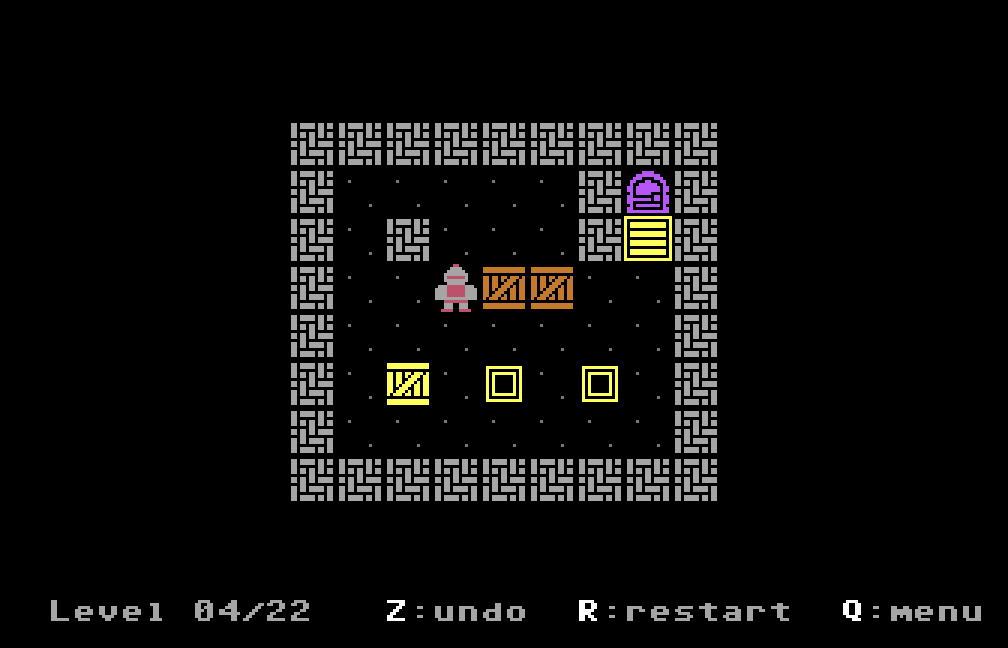
The crate tiles give a nice detail for free: a crate takes the color of the ground under it, so a crate pushed onto a yellow switch turns yellow and shows that the switch is pressed:
// 9-14: crate on top, in the color of its ground (its own on the floor)
buildTile(9 + ground, &ART_CRATE, ground ? GROUND_ART[ground]->color : ART_CRATE.color);And this is the result:
Heroes as hardware sprites
The heroes are not tiles but hardware sprites, drawn by the VIC-II over the characters.
This way a hero standing on an exit or a switch keeps both its own colors and the ground under it, with no need for a tile per hero per ground.
A hires sprite is 24×21 pixels in one color, so each hero is made of two 16×16 sprites at the same position: one for the main color and one for the detail color.
The drawings use 1 for the main color, 2 for the detail and . for transparent:
".......11.......",
"......2222......",
".....222222.....",
"....22222222....",
"....21111112....",
"....22222222....",
".....222222.....",
"..222111111222..",That is the top half of the fighter: a grey helmet and armor with red details.
At startup the drawing is split into the two sprites, three bytes per row:
for (unsigned char row = 0; row < 16; row++) {
	for (unsigned char x = 0; x < 16; x++) {
		char pixel = ART_HERO[hero][row * 16 + x];
		unsigned char bit = 0x80 >> (x & 7);
		if (pixel == '1') {
			mainSprite[row * 3 + (x >> 3)] |= bit;
		}
		if (pixel == '2') {
			detailSprite[row * 3 + (x >> 3)] |= bit;
		}
	}
}Six sprites out of eight are used: 0-2 are the main colors of fighter, wizard and thief, 3-5 their details.
After every turn updateSprites() looks for the heroes in the grid, places both sprites on the hero’s cell and colors them: the active hero has its own colors, the waiting ones turn grey.
placeHero(hero, 24 + (levelX + 2 * x) * 8, 50 + (levelY + 2 * y) * 8);
vic.spr_color[hero] = active ? COL_HERO_ACTIVE[hero] : COL_HERO_WAITING[hero];
vic.spr_color[3 + hero] = active ? COL_HERO_DETAIL[hero] : COL_HERO_WAITING_DETAIL[hero];
enabled |= (1 << hero) | (8 << hero);The 24 and 50 are the offsets between sprite coordinates and the first character of the screen, and a hero crushed by a door simply has its sprites switched off.
The half-way frame
A turn-based game that jumps 16 pixels at every move feels jumpy, so each move is shown half way for three frames, 60 ms on a PAL machine, and then in place.
The rules already provide the list of everything that moved, with its starting cell and direction.
Half a tile is exactly one character, so a crate half way is just its tile drawn one character further, straddling its old and new cell, while a hero sprite simply moves by 8 pixels:
// one character from its cell, in the direction of the move
int column = levelX + 2 * x + DIR_X[direction];
int row = levelY + 2 * y + DIR_Y[direction];
unsigned char object = movedObject[moved];
// a crate is redrawn there, a hero sprite is moved there
if (object == S_CRATE) {
	drawTileAt(column, row, tileForCell(F_NONE, S_CRATE));
}
else {
	if (isHero(object)) {
		placeHero((object - S_FIGHTER) % 3, 24 + column * 8, 50 + row * 8);
	}
}During that frame a crate always uses the plain floor tile, even if it is leaving a switch: in 60 ms nobody notices.
After the move, redrawChanges() compares the new packed state with the previous one and redraws only the cells that are different.
Undo in the RAM under the BASIC ROM
A puzzle game without undo is a punishment, and PuzzleScript has unlimited undo, so I wanted as many steps as possible.
The C64 has 64 KB of RAM, but some of it is hidden under the ROMs: from $A000 to $BFFF the CPU normally sees the BASIC interpreter.
The game never uses BASIC, so once the graphics are built it switches the BASIC ROM off for good, writing $36 in address 1, and those 8 KB become free RAM:
// from now on the BASIC ROM stays off ($36 in address 1): the game does
// not use BASIC, and the RAM under it holds the undo states
*(volatile char *)1 = 0x36;The undo stack lives there as a ring buffer of packed states, one byte per cell, so the number of steps depends on the size of the level:
cellCount = levelWidth * levelHeight;
undoSlots = UNDO_BYTES / cellCount;The biggest level, 18×13 cells, keeps 35 steps, while a small 13×5 level keeps 126.
When the ring is full, the oldest state is overwritten, so undo never runs out of memory, it only forgets the oldest moves:
// copy the state into the slot at undoHead
memcpy(UNDO_BUFFER + undoHead * cellCount, state, cellCount);
// next slot, back to the first after the last one
undoHead = undoHead + 1 == undoSlots ? 0 : undoHead + 1;
// when the ring is full the oldest state is lost, so the count stops
if (undoCount < undoSlots) {
	undoCount++;
}A turn that changes nothing is not saved, and restart is saved like a move, so it can be undone too.
Sound effects as SID note lists
The rules return a byte of flags, one bit per kind of event: something pushed, a wizard swap, a hero switch, a door opening or closing.
The C64 side turns them into SID effects, written in sounds.h as lists of notes:
// one note of a sound effect: frequency, change of the frequency at every
// frame, waveform, length in frames (a note with length 0 ends the effect)
typedef struct { unsigned int freq; int slide; unsigned char wave, frames; } Note;A note sets frequency and waveform for a number of frames, and its slide is added to the frequency at every frame, which gives the rising and falling sounds:
// wizard swap, pulse going up
static const Note SOUND_TELEPORT[] = {
	{ 0x0600,  0x0400, PULSE, 12 },
	{ 0 }
};

// level solved, C E G C
static const Note SOUND_WIN[] = {
	{ NOTE_C5, 0, TRI, 6 },
	{ NOTE_E5, 0, TRI, 6 },
	{ NOTE_G5, 0, TRI, 6 },
	{ NOTE_C6, 0, TRI, 14 },
	{ 0 }
};updateSounds() runs once per frame and advances every playing effect: no interrupt, no music player, about thirty lines of C.
The three SID voices have separate jobs, so the sounds of one turn can be heard together: pushes and steps on voice 0, doors on voice 1, wizard swap and hero switch on voice 2.
A step is a short burst of noise, played only when a hero moved and nothing was pushed, which the C64 side finds in the list of moved objects.
Level codes, the loader and the disk
Saving progress on a C64 means writing to disk, which is slow and does not work from every loader or cartridge, so I added the classic solution of the era: level codes.
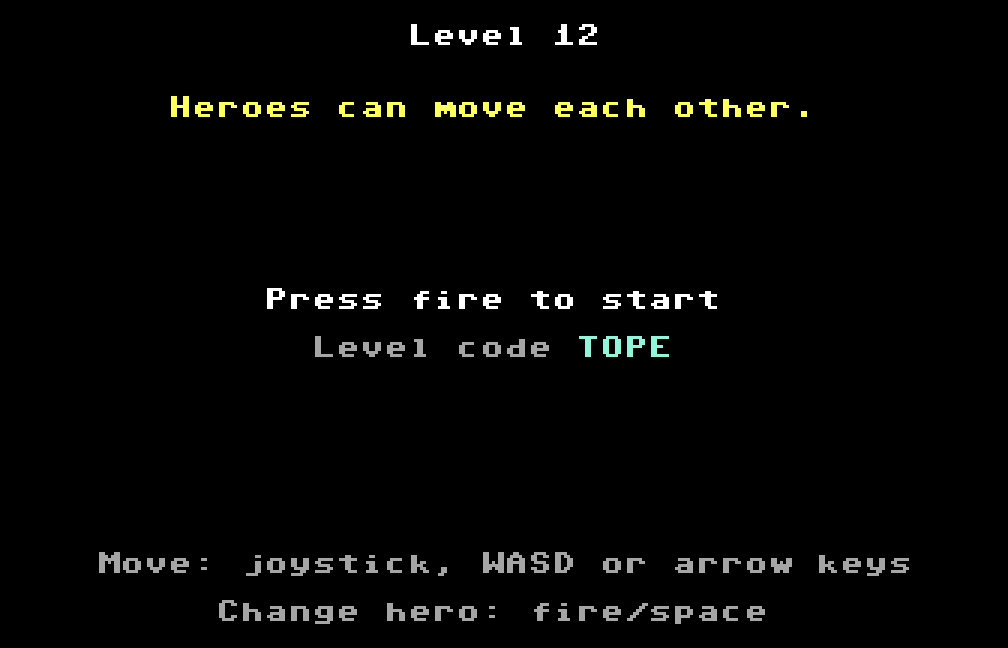
Every level starts with a screen showing its number, the message of the original, and a four letter code.
The codes are a plain list in levels.h, one per level in order, next to the levels themselves:
// the codes of the levels
static const char * const LEVEL_CODES[] = {Enter code on the title page reads four letters, from the keyboard or with the joystick, and entryOfCode() walks the levels comparing their codes, so a level without a code simply has none, and adding a level never breaks the others.
Starting by itself
Oscar64 builds a program that loads at $0801 and starts with a BASIC line, SYS 2061, so on its own it needs RUN after loading.
To make the disk start by itself with LOAD"*",8,1, the first file on the disk is a small loader written in assembly.
It is loaded with secondary address 1 at $02A7, and it ends exactly on the BASIC vector IMAIN at $0302, overwriting it with its own address:
; fill up to the vectors, then the two vectors themselves
        !fill IERROR - *, 0
        !word $e38b          ; IERROR: unchanged default value
!word start ; IMAIN: our code, so we start automaticallyWhen a LOAD ends, BASIC jumps through IMAIN, so instead of printing READY. and waiting, the C64 runs the loader.
The loader puts IMAIN back, loads the game, called heroes main on the disk, from the same drive, and starts it exactly as RUN would.
Two compiler bugs I worked around
Oscar64 is an impressive compiler: it brings C99 and a good part of C++ to the 6502, and the code it generates is small and fast.
Still, the version I used miscompiled two pieces of my code, and both left a mark on the sources.
The first one is the fighter’s push.
Written literally as the PuzzleScript rule, a loop repeated until nothing changes, it compiled to code that never ended.
The walk you saw in the rules section does the same job and compiles correctly, and a comment next to it explains why it is written that way.
The second one is in the title page, where the torch handles are drawn: (TORCH_ROW + r) * 40 was computed in 8 bits, so rows past the sixth wrapped around.
Here the fix is to make the offset grow by 40 at every row instead of multiplying:
// the handle: the offset grows by one row (40) at a time, because
// Oscar64 computed (TORCH_ROW + r) * 40 in 8 bits here, losing rows
// past the 6th
unsigned int offset = TORCH_ROW * 40 + TORCH_COLUMN[torch];The lesson is the usual one with 8-bit compilers: when something on screen looks wrong and the code looks right, check the generated assembly, which Oscar64 writes in a .asm file next to the program at every build.
The rules were the easy part to trust, because the same file ran on gcc against the official engine.
What’s next
The method works for any PuzzleScript game with a short rule list: rules written by hand in a file with no machine code, checked move by move against the official engine, and levels kept as text.
The levels of this port can be replaced by pasting new ones from the PuzzleScript editor into levels.h, so you can build your own version with the same three heroes.
In the Heroes of Sokoban 64 itch.io page you can find the d64 disk image, the prg file and the commented C source code, with a README that explains how to change levels, graphics, sounds and texts.