

Reducing Tiled Maps to Optimized Collision Rectangles with Greedy Merging
Talking about Javascript.
Tile-based editors like Tiled are excellent authoring tools. They allow designers to think in terms of cells, patterns, and repetition, which is exactly what makes them productive.
However, the data they produce is optimized for editing, not for runtime use.
A collision layer exported from Tiled is essentially a dense grid: one value per cell, even when large contiguous areas represent the same solid structure. Treating that grid naively at runtime means processing hundreds or thousands of individual tiles that all describe the same thing.
What we want instead is a compact geometric representation of the same information.
From tile grids to geometry
Consider a typical solid layer in a Tiled map:
- Width × height cells.
- Each cell contains a
gid. gid !== 0usually means “solid”.
From a gameplay or engine perspective, iterating over every solid tile is unnecessary. A wall that is ten tiles wide does not become more precise because it is split into ten separate pieces.
The important observation is simple:
The grid already contains higher-level structure: it is just implicit.
Greedy rectangle merging, explained in this post, is a way to recover that structure by grouping adjacent filled cells into larger axis-aligned rectangles.
Converting Tiled data into a binary grid
The first step is purely mechanical.
A Tiled tilelayer stores its data as a flat array. To apply a grid-based algorithm, we convert it into a 2D matrix where:
1represents a filled tile (gid !== 0).0represents an empty tile.
At this point, all editor-specific information is gone.
What remains is a simple binary grid that describes occupancy.
This separation is intentional: the greedy algorithm does not know anything about Tiled, tilesets, or pixels. It operates only on abstract data.
Applying greedy rectangle merging
The greedy algorithm scans the grid from top-left to bottom-right.
When it encounters a filled cell that has not been consumed yet, it starts a rectangle and expands it as far as possible.
Two expansion strategies are possible:
- Expand horizontally first, then vertically.
- Expand vertically first, then horizontally.
Each strategy favors different spatial patterns. Neither is universally better, but both are fast and deterministic.
In a production context, the simplest and most effective approach is to run both strategies and keep the one that produces fewer rectangles. This adds negligible overhead while avoiding many suboptimal cases.
The result is a list of rectangles that:
- Cover exactly the same area as the original grid.
- Never overlap.
- Never include empty cells.
Why this reduction matters
Replacing a dense grid with a small set of rectangles has immediate practical benefits.
Fewer collision checks: instead of testing against hundreds of tiles, the engine only needs to test against a handful of rectangles.
Simpler logic: rectangles are easier to reason about than scattered cells. Movement, intersection, and broad-phase checks all become simpler.
Better performance: the greedy merge runs once as a preprocessing step. At runtime, the reduced representation is significantly cheaper to work with.
Clear separation of concerns: tiled remains an authoring tool. The runtime representation is optimized independently, without forcing design decisions into the editor.
The final result
In the final example, the Tiled map is reduced to a single set of rectangles selected by the greedy “best-of-two” strategy. No intermediate steps are shown, no comparison is needed.
This is the representation you would actually ship:
- Compact.
- Deterministic.
- Easy to integrate into collision systems, triggers, or physics engines.
The important takeaway is not the specific algorithm, but the idea that editor-friendly data should almost never be used directly at runtime. A small preprocessing step can drastically simplify everything that follows.
To test greedy rectangle merging, I imported this Tiled map:
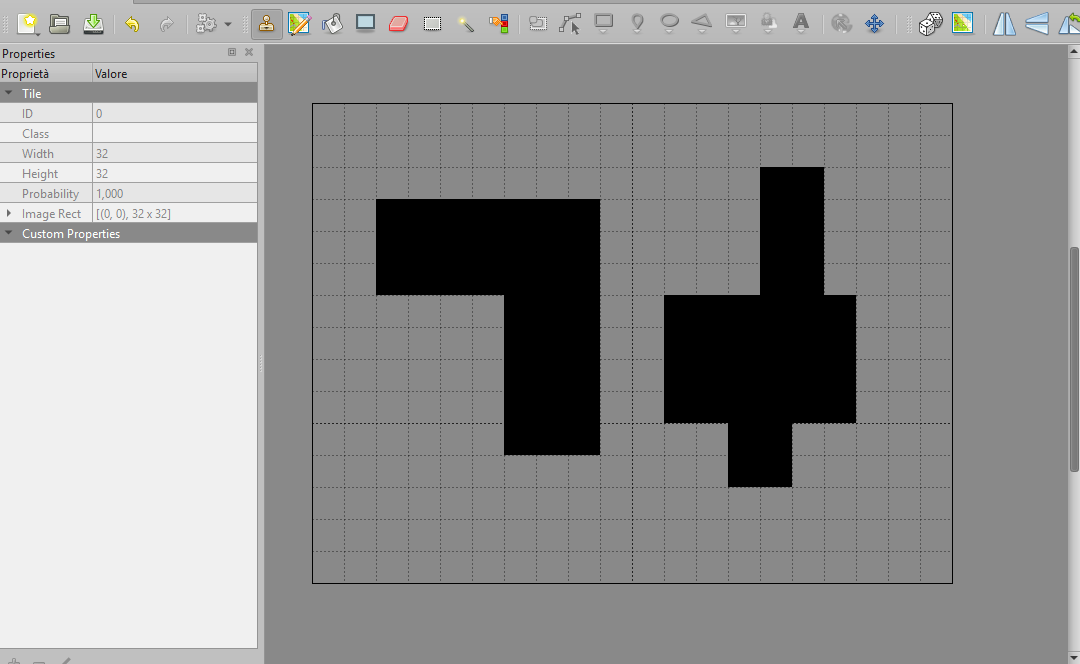
Once exported, the tmj file is this one:
{ "compressionlevel":-1,
 "height":15,
 "infinite":false,
 "layers":[
        {
         "data":[0, 0, 0, 0, 0, 0, 0, 0, 0, 0, 0, 0, 0, 0, 0, 0, 0, 0, 0, 0,
            0, 0, 0, 0, 0, 0, 0, 0, 0, 0, 0, 0, 0, 0, 0, 0, 0, 0, 0, 0,
            0, 0, 0, 0, 0, 0, 0, 0, 0, 0, 0, 0, 0, 0, 1, 1, 0, 0, 0, 0,
            0, 0, 1, 1, 1, 1, 1, 1, 1, 0, 0, 0, 0, 0, 1, 1, 0, 0, 0, 0,
            0, 0, 1, 1, 1, 1, 1, 1, 1, 0, 0, 0, 0, 0, 1, 1, 0, 0, 0, 0,
            0, 0, 1, 1, 1, 1, 1, 1, 1, 0, 0, 0, 0, 0, 1, 1, 0, 0, 0, 0,
            0, 0, 0, 0, 0, 0, 1, 1, 1, 0, 0, 1, 1, 1, 1, 1, 1, 0, 0, 0,
            0, 0, 0, 0, 0, 0, 1, 1, 1, 0, 0, 1, 1, 1, 1, 1, 1, 0, 0, 0,
            0, 0, 0, 0, 0, 0, 1, 1, 1, 0, 0, 1, 1, 1, 1, 1, 1, 0, 0, 0,
            0, 0, 0, 0, 0, 0, 1, 1, 1, 0, 0, 1, 1, 1, 1, 1, 1, 0, 0, 0,
            0, 0, 0, 0, 0, 0, 1, 1, 1, 0, 0, 0, 0, 1, 1, 0, 0, 0, 0, 0,
            0, 0, 0, 0, 0, 0, 0, 0, 0, 0, 0, 0, 0, 1, 1, 0, 0, 0, 0, 0,
            0, 0, 0, 0, 0, 0, 0, 0, 0, 0, 0, 0, 0, 0, 0, 0, 0, 0, 0, 0,
            0, 0, 0, 0, 0, 0, 0, 0, 0, 0, 0, 0, 0, 0, 0, 0, 0, 0, 0, 0,
            0, 0, 0, 0, 0, 0, 0, 0, 0, 0, 0, 0, 0, 0, 0, 0, 0, 0, 0, 0],
         "height":15,
         "id":1,
         "name":"my name",
         "opacity":1,
         "type":"tilelayer",
         "visible":true,
         "width":20,
         "x":0,
         "y":0
        }],
 "nextlayerid":2,
 "nextobjectid":1,
 "orientation":"orthogonal",
 "renderorder":"right-down",
 "tiledversion":"1.11.0",
 "tileheight":32,
 "tilesets":[
        {
         "columns":1,
         "firstgid":1,
         "image":"tile.png",
         "imageheight":32,
         "imagewidth":32,
         "margin":0,
         "name":"tile",
         "spacing":0,
         "tilecount":1,
         "tileheight":32,
         "tilewidth":32
        }],
 "tilewidth":32,
 "type":"map",
 "version":"1.10",
 "width":20
}
What we need to extract, is data content inside layers.
It can be done with a simple script like this one, which relies on greedyMergeBest function.
<!DOCTYPE html>
<html lang="en">
<head>
    <meta charset="UTF-8">
    <meta name="viewport" content="width=device-width, initial-scale=1.0">
    <style>
        body {
            margin: 0;
        }
        .stage {
            position: relative;
            border: 1px solid #ccc;
            background: #fafafa;
        }
        .rect {
            position: absolute;
            background: rgba(255, 0, 0, 0.18);
            border: 1px solid rgba(255, 0, 0, 0.85);
            box-sizing: border-box;
        }
    </style>
</head>
<body>

    <div id="stage" class="stage"></div>


    <script type="module">

        import { greedyMergeBest } from './greedy.js';

        const MAPURL = './map.tmj';
        const CELLSIZE = 32;

        const tiled = await fetch(MAPURL).then(r => r.json());

        const layer = tiled.layers.find(l => l.type === 'tilelayer');

        const width = tiled.width;
        const height = tiled.height;

        const grid = [];
        let filled = 0;

        for (let i = 0; i < height; i ++) {
	    grid[i] = [];
	        for (let j = 0; j < width; j ++) {
		        const gid = layer.data[i * width + j];
		        const v = gid !== 0 ? 1 : 0;
		        grid[i][j] = v;
	        }
        }

        const result = greedyMergeBest(grid);
        const rects = result.rectangles;

        const stage = document.getElementById('stage');
        stage.style.width = (width * CELLSIZE) + 'px';
        stage.style.height = (height * CELLSIZE) + 'px';

        for (const r of rects) {
	        const d = document.createElement('div');
	        d.className = 'rect';
	        d.style.left = (r.x * CELLSIZE) + 'px';
	        d.style.top = (r.y * CELLSIZE) + 'px';
	        d.style.width = (r.w * CELLSIZE) + 'px';
	        d.style.height = (r.h * CELLSIZE) + 'px';
	        stage.appendChild(d);
        }
    </script>
</body>
</html>
And this is the result, rendered as DOM objects:
As you can see, the structure is way simpler.
All of this is made possible by the greedyMerge function, which transforms a dense binary grid into a small set of practical, engine-ready rectangles.
You can see the theory behind greedy merging here, or download the full source code and test it by yourself.
Never miss an update! Subscribe, and I will bother you by email only when a new game or full source code comes out.