From Dense Grids to Clean Perimeters: Extracting Shapes with Greedy Geometry – Tiled and JavaScript example
When working with grid-based data, the raw representation is almost never the one you want at runtime. A binary grid is easy to author and debug, but it is expensive, redundant, and awkward to use for anything involving geometry, collision, or movement.
Sometimes, what we actually want is the shape defined by that grid.
This post walks through a practical approach to extract the true external perimeter of filled cells using a greedy strategy, and how to visualize the result with a simple HTML example.
The Problem with Cell-Based Geometry
A binary grid is conceptually simple: 1 means solid, 0 means empty.
But geometrically, it is extremely verbose. A large contiguous area may be represented by hundreds of individual cells, even though it forms a single coherent shape. Treating each cell independently leads to unnecessary complexity, especially when the goal is to reason about boundaries rather than interiors.
The real information we care about is not which cells are filled, but where the solid region begins and ends.
Step 1: Greedy Rectangle Merging
The first optimization step is greedy rectangle merging.
Instead of treating each filled cell as an isolated unit, adjacent cells are merged into larger axis-aligned rectangles. The algorithm scans the grid top-left to bottom-right, expanding either horizontally or vertically, consuming as much contiguous area as possible before moving on.
Two strategies are evaluated:
- Horizontal-first expansion.
- Vertical-first expansion.
The result with fewer rectangles is selected. This produces a compact representation of the filled area while remaining extremely fast and predictable.
At this stage, the grid is no longer a sea of cells, but a small set of non-overlapping rectangles.
I already explained this concept in the post Greedy Rectangle Merging: Turning Binary Grids into Simple Geometry – JavaScript example.
Step 2: Why Rectangles Are Still Not Enough
Rectangles are already a big improvement, but they are still an intermediate representation.
If multiple rectangles touch or overlap along edges, their internal borders are meaningless. For collision, rendering outlines, or path following, we need the true external perimeter, not the sum of rectangle edges.
This means internal edges must disappear completely, and the concept explained in the post Reducing Tiled Maps to Optimized Collision Rectangles with Greedy Merging is not the best possible solution.
Step 3: Extracting the External Perimeter
The key insight is simple: the perimeter is defined by filled cells adjacent to empty space.
Instead of working from rectangles, the perimeter is extracted directly from the binary grid:
- For each filled cell:
- Add a top edge if the cell above is empty.
- Add a bottom edge if the cell below is empty.
- Add a left edge if the cell to the left is empty.
- Add a right edge if the cell to the right is empty.
This produces a raw set of perimeter segments. Internal edges never appear, because adjacent filled cells cancel them out naturally.
The result is correct by construction.
Step 4: Merging Collinear Segments
At this point, the perimeter exists, but it is fragmented into many small segments. Adjacent collinear segments are then merged into longer ones, dramatically simplifying the geometry.
Horizontal segments are grouped by Y coordinate and merged left-to-right.
Vertical segments are grouped by X coordinate and merged top-to-bottom.
After this pass, the perimeter becomes a clean set of long, meaningful edges.
Step 5: Building Closed Loops
Finally, the merged segments are connected end-to-end to form ordered closed loops. Each loop is represented as a sequence of vertices, describing a complete polygonal outline of a solid region.
These loops are directly usable by:
- Rendering systems.
- Physics engines.
- AI pathing.
- Procedural animation.
- Any framework that accepts polygonal paths.
The HTML Visualization
The accompanying HTML example renders the result directly in the browser using SVG:
- The original grid defines the solid area.
- The greedy logic extracts the perimeter.
- The final outline is drawn as clean vector paths.
Seeing the result immediately makes the benefit obvious: a complex grid collapses into a small number of meaningful geometric shapes.
This was the initial Tiled map:
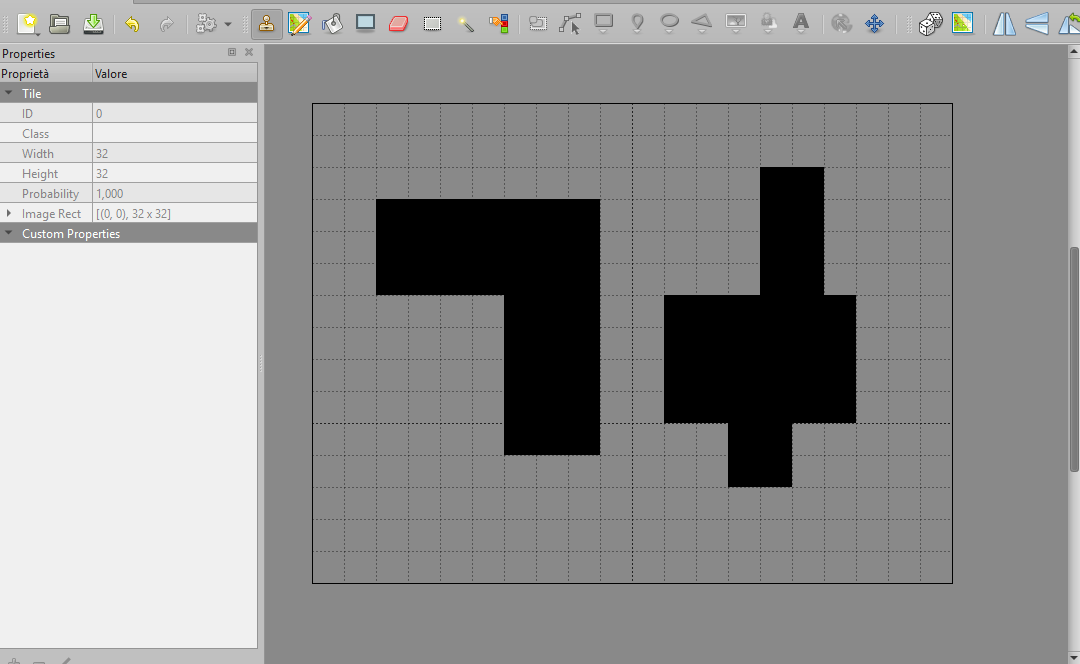
And these are the final loops, rendered in real time:
This is the content of greedy.js:
/**
	=========================================================
	GREEDY RECTANGLE MERGING + PERIMETER EXTRACTION
	---------------------------------------------------------
	Pipeline:
	1) binary grid (0/1)
	2) greedy rectangle merging
	3) external perimeter extraction
	4) collinear segment merging
	5) closed loop construction

	Output:
	- rectangles
	- perimeter segments
	- ordered closed loops
	=========================================================
*/

/**
	Performs greedy rectangle merging on a binary grid.
*/
function greedyMerge(grid, mode) {

	const height = grid.length;
	const width = grid[0].length;

	const visited = new Array(height);
	for (let i = 0; i < height; i++) {
		visited[i] = new Array(width).fill(false);
	}

	const rectangles = [];

	for (let i = 0; i < height; i++) {
		for (let j = 0; j < width; j++) {

			if (visited[i][j] || grid[i][j] === 0) {
				visited[i][j] = true;
				continue;
			}

			let w = 1;
            let h = 1;

			if (mode === 'horizontal-first') {

				while (j + w < width && !visited[i][j + w] && grid[i][j + w] === 1) {
					w++;
				}

				while (i + h < height) {
					let rowOk = true;

					for (let k = j; k < j + w; k++) {
						if (visited[i + h][k] || grid[i + h][k] === 0) {
							rowOk = false;
							break;
						}
					}

					if (!rowOk) {
                        break;
                    }
					h++;
				}

			} else {

				while (i + h < height && !visited[i + h][j] && grid[i + h][j] === 1) {
					h++;
				}

				while (j + w < width) {
					let colOk = true;

					for (let k = i; k < i + h; k++) {
						if (visited[k][j + w] || grid[k][j + w] === 0) {
							colOk = false;
							break;
						}
					}

					if (!colOk) {
                        break;
                    }
					w++;
				}
			}

			for (let k = i; k < i + h; k++) {
				for (let l = j; l < j + w; l++) {
					visited[k][l] = true;
				}
			}

			rectangles.push({
                x: j,
                y: i,
                w,
                h
            });
		}
	}

	return rectangles;
}

/**
	Runs both greedy strategies and keeps the one
	that produces fewer rectangles.
*/
function greedyMergeBest(grid) {

	const horizontal = greedyMerge(grid, 'horizontal-first');
	const vertical = greedyMerge(grid, 'vertical-first');

	if (vertical.length < horizontal.length) {
		return {
            rectangles: vertical,
            mode: 'vertical-first'
        };
	}

	return {
        rectangles: horizontal,
        mode: 'horizontal-first'
    }
}

/**
	Extracts the true external perimeter directly from a binary grid.

	Output:
	- array of segments { x1, y1, x2, y2 }
*/
function buildPerimeterFromGrid(grid) {

	const height = grid.length;
	const width = grid[0].length;
	const segments = [];

	function isFilled(i, j) {
		if (i < 0 || j < 0 || i >= height || j >= width) {
			return false;
		}
		return grid[i][j] === 1;
	}

	for (let i = 0; i < height; i++) {
		for (let j = 0; j < width; j++) {

			if (grid[i][j] === 0) {
                continue;
            }

			// top
			if (!isFilled(i - 1, j)) {
				segments.push({
                    x1: j,
                    y1: i,
                    x2: j + 1,
                    y2: i
                });
			}

			// bottom
			if (!isFilled(i + 1, j)) {
				segments.push({
                    x1: j,
                    y1: i + 1,
                    x2: j + 1,
                    y2: i + 1
                });
			}

			// left
			if (!isFilled(i, j - 1)) {
				segments.push({
                    x1: j,
                    y1: i,
                    x2: j,
                    y2: i + 1
                });
			}

			// right
			if (!isFilled(i, j + 1)) {
				segments.push({
                    x1: j + 1,
                    y1: i,
                    x2: j + 1,
                    y2: i + 1
                });
			}
		}
	}

	return segments;
}


/**
	Merges collinear and adjacent perimeter segments.
*/
function mergeCollinearSegments(segments) {

	const horizontal = new Map();
	const vertical = new Map();

	for (const s of segments) {
		if (s.y1 === s.y2) {
			if (!horizontal.has(s.y1)) {
                horizontal.set(s.y1, []);
            }
			horizontal.get(s.y1).push(s);
		} else {
			if (!vertical.has(s.x1)) {
                vertical.set(s.x1, []);
            }
			vertical.get(s.x1).push(s);
		}
	}

	const result = [];

	for (const list of horizontal.values()) {

		list.sort((a, b) => a.x1 - b.x1);
		let current = { ...list[0] };

		for (let i = 1; i < list.length; i++) {
			if (current.x2 === list[i].x1) {
				current.x2 = list[i].x2;
			} else {
				result.push(current);
				current = { ...list[i] };
			}
		}

		result.push(current);
	}

	for (const list of vertical.values()) {

		list.sort((a, b) => a.y1 - b.y1);
		let current = { ...list[0] };

		for (let i = 1; i < list.length; i++) {
			if (current.y2 === list[i].y1) {
				current.y2 = list[i].y2;
			} else {
				result.push(current);
				current = { ...list[i] };
			}
		}

		result.push(current);
	}

	return result;
}

/**
	Builds closed loops from perimeter segments.

	Output:
	- array of loops
	- each loop is an ordered array of points { x, y }
*/
function buildLoops(segments) {

	const adjacency = new Map();

	function key(p) {
		return `${p.x},${p.y}`;
	}

	function addEdge(a, b) {
		const ka = key(a);
		const kb = key(b);

		if (!adjacency.has(ka)) {
            adjacency.set(ka, []);
        }

		if (!adjacency.has(kb)) {
            adjacency.set(kb, []);
        }

		adjacency.get(ka).push(b);
		adjacency.get(kb).push(a);
	}

	for (const s of segments) {
		addEdge({ x: s.x1, y: s.y1 }, { x: s.x2, y: s.y2 });
	}

	const loops = [];
	const visitedEdges = new Set();

	function edgeKey(a, b) {
		return `${key(a)}-${key(b)}`;
	}

	for (const [startKey, neighbors] of adjacency.entries()) {

		for (const next of neighbors) {

			const start = parsePoint(startKey);
			const ek = edgeKey(start, next);
			if (visitedEdges.has(ek))  {
                continue;
            }

			const loop = [start];
			let current = start;
			let previous = null;

			while (true) {

				const candidates = adjacency.get(key(current));
				let chosen = null;

				for (const c of candidates) {
					if (previous && c.x === previous.x && c.y === previous.y) {
                        continue;
                    }
					chosen = c;
					break;
				}

				if (!chosen) {
                    break;
                }

				visitedEdges.add(edgeKey(current, chosen));
				visitedEdges.add(edgeKey(chosen, current));

				previous = current;
				current = chosen;

				if (current.x === start.x && current.y === start.y) {
					break;
				}

				loop.push(current);
			}

			if (loop.length > 2) {
				loops.push(loop);
			}
		}
	}

	return loops;
}

function parsePoint(key) {
	const [x, y] = key.split(',').map(Number);
	return { x, y };
}

/**
	High-level helper:
	grid ? rectangles ? loops
*/
function extractGreedyLoops(grid) {

	const result = greedyMergeBest(grid);

	const rawSegments = buildPerimeterFromGrid(grid);

	const merged = mergeCollinearSegments(rawSegments);

	const loops = buildLoops(merged);

	return {
		mode: result.mode,
		rectangles: result.rectangles,
		segments: merged,
		loops
	};
}


export {
	greedyMerge,
	greedyMergeBest,
	buildPerimeterFromGrid,
	mergeCollinearSegments,
	buildLoops,
	extractGreedyLoops
};
And this is index.html, used just to display the paths:
??<!DOCTYPE html>
<html lang="en">
<head>
    <meta charset="UTF-8">
    <meta name="viewport" content="width=device-width, initial-scale=1.0">
    <style>
        body {
            font-family: sans-serif;
            margin: 0;
        }

        .wrapper {
            max-width: 800px;
            margin: 20px auto;
        }

        svg {
            border: 1px solid #ccc;
            background: #fafafa;
            margin-top: 10px;
        }

        line {
            stroke: #d00;
            stroke-width: 1;
        }

        .path {
            margin-bottom: 10px;
            padding: 6px;
        }
    </style>
    </head>
<body>
    <div class="wrapper">
	    <div id="title"></div>
	    <svg id="svg"></svg>
	    <div id="paths"></div>
    </div>

    <script type="module">

        import { greedyMergeBest, buildPerimeterFromGrid, mergeCollinearSegments, buildLoops } from './greedy.js';

        const CELLSIZE = 16;

        /* load tiled */
        const tiled = await fetch('./map.tmj').then(r => r.json());
        const layer = tiled.layers.find(l => l.type === 'tilelayer');

        const width = tiled.width;
        const height = tiled.height;

        /* tiled ? grid */
        const grid = [];
        for (let i = 0; i < height; i++) {
	        grid[i] = [];
	        for (let j = 0; j < width; j++) {
		        grid[i][j] = layer.data[i * width + j] !== 0 ? 1 : 0;
	        }
        }

        /* perimeter pipeline */
        const mergeResult = greedyMergeBest(grid);
        const rawSegments = buildPerimeterFromGrid(grid);
        const segments = mergeCollinearSegments(rawSegments);
        const loops = buildLoops(segments);

        /* svg setup */
        const svg = document.getElementById('svg');
        svg.setAttribute('width', width * CELLSIZE);
        svg.setAttribute('height', height * CELLSIZE);
        svg.setAttribute('viewBox', `0 0 ${width * CELLSIZE} ${height * CELLSIZE}`);

        /* draw segments */
        for (const s of segments) {
            const line = document.createElementNS('http://www.w3.org/2000/svg', 'line');
            line.setAttribute('x1', s.x1 * CELLSIZE);
	        line.setAttribute('y1', s.y1 * CELLSIZE);
	        line.setAttribute('x2', s.x2 * CELLSIZE);
	        line.setAttribute('y2', s.y2 * CELLSIZE);
            svg.appendChild(line);
        }

        /* print paths */
        const pathsDiv = document.getElementById('paths');
        loops.forEach((loop, index) => {
            const box = document.createElement('div');
	        box.className = 'path';
            let text = '<strong>Path ' + index + '</strong> (' + loop.length + 'vertices)<br />';
            for (let i = 0; i < loop.length; i++) {
		        const p = loop[i];
		        text += '<strong>' + i + '</strong>:(' + p.x + ',' + p.y + ') ';
	        }
            box.innerHTML = text;
	        pathsDiv.appendChild(box);
        });

        document.getElementById('title').innerHTML = '<strong>Perimeter segments</strong>: ' + segments.length + ' - <strong>Paths</strong>: ' + loops.length + ' - <strong>Mode</strong>: ' + mergeResult.mode;
    </script>
</body>
</html>
Why This Approach Works So Well
This pipeline has several important properties:
- Deterministic and fast.
- No floating-point drift.
- No topology guessing.
- No special cases.
- Sales linearly with grid size.
Most importantly, it transforms editor-friendly data into runtime-friendly geometry without losing any information.
Soon, you will see this concept applied to a game, meanwhile download the source code of the entire project, Tiled map included.
