In this step, we’ll see how to configure WordPress to turn it into an arcade site.
Remember that my final goal is to self-populate my arcade site with MochiAds feed but if you understand how does it work, you can easily custom it to meet you needs.
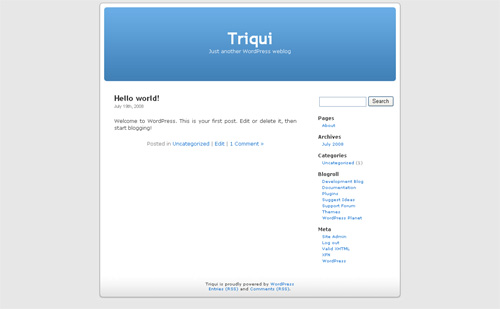
There are many ways to add a game at this point, but I want to do it in a way that will be easy to automate once I’ll parse MochiAds feeds.
First, let’s see the JSON feed of Jamag:
{"rating": "Everyone", "updated": "2008-07-19", "popularity": null, "description": "Jamag = Just Another Mouse Avoider Game\r\n\r\nBut with something new...", "key_mappings": "", "height": 500, "game_url": "http://www.mochiads.com/games/jamag", "slug": "jamag", "tags": ["mouse", "avoid", "avoider"], "instructions": "Control the red circle with the mouse\r\nCollect purple circles, avoid blue ones\r\nEvery 10 circles collected there will be an explosion\r\nUse it to wipe away blue circles\r\nPress mouse button to activate bullet time\r\nThat's all... it's just another mouse avoider game...", "uuid": "89285254-78b1-3248-9db3-f5ab67ecc542", "author": "Triqui", "control_scheme": "{\"fire\": \"na\", \"jump\": \"na\", \"movement\": \"mouse\"}", "author_link": "http://mochiads.com/community/profile/Triqui", "feed_approval_created": "2008-05-17T14:32:26.644771-08:00", "name": "Jamag", "swf_url": "http://games.mochiads.com/c/g/jamag/jamag_secure.swf", "recommended": false, "thumbnail_url": "http://cdn.mochiads.com/c/g/jamag/_thumb_100x100.jpg", "created": "2008-05-17T12:00:43.262589-08:00", "categories": ["Action", "Other"], "game_tag": "5596fb87fd0f2de1", "leaderboard_enabled": true, "zip_url": "http://cdn.mochiads.com/c/g/jamag.zip", "width": 500}
This code has been already explained in step 1, so let’s jump directly to the post I am writing:
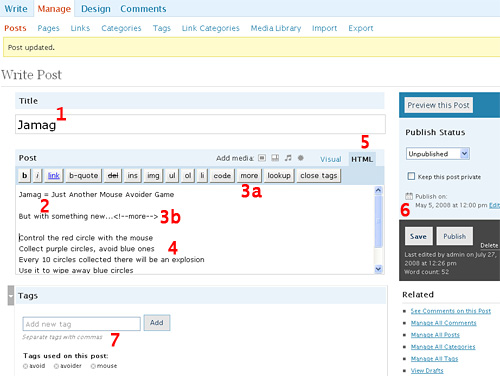
The title of the post (1) is the name field of the feed
The post itself is made by the description field (2), the more tag (3a/3b) and the instructions field (4).
Remove the \r\n from description and instructions, making new lines with your keyboard. Every \r\n is a new line.
Switching your edit area to HTML (5) could help you.
The publication data of the post (6) must be the same as the created field and the Tags are the same of the tags field (7).
Check all categories that match with categories field and check “Leaderboard enabled” is the leaderboard_enabled field is set to true
When filled all these fields, most bloggers just click on “Publish” and the post goes live.
We have to go more in-depth and use the Custom Fields in the Advanced Options
Custom Fields
WordPress has the ability to allow post authors to assign custom fields to a post. This arbitrary extra information is known as meta-data.
Meta-data is handled with key/value pairs. The key is the name of the meta-data element. The value is the information that will appear in the meta-data list on each individual post that the information is associated with.
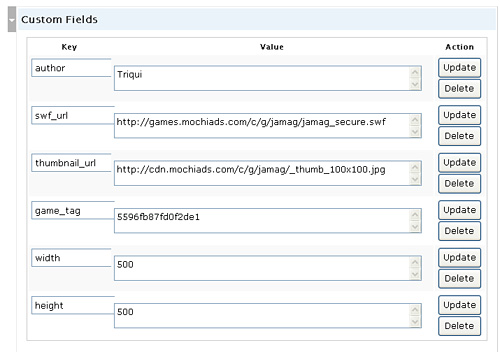
the Key field contains the name of the feed field, while the Value field contains the value of the feed field.
I wanted to save author name, swf and thumbnail urls, game tag and swf’s width and height.
Finally it’s time to publish the post.
The game
This is how our entry looks like in the home page
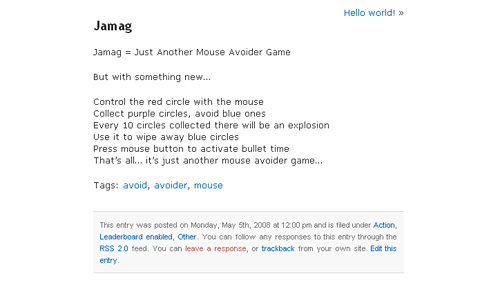
and in the post page
Everything seems to be ok but we can’t play the game… we need to get meta-data and display the swf.
To fetch meta values I’ll use the get_post_meta() function:
get_post_meta($post_id, $key, $single);
$post_id is the ID of the post you want the meta values for.
$key is a string containing the name of the meta value you want.
$single can either be true or false. If set to true then the function will return a single result, as a string. If false, or not set, then the function returns an array of the custom fields.
So in our case to get the movie width I’ll use
get_post_meta($post->ID, "width", true);
Now it’s time to edit the theme.
Editing the theme
With your favourite ftp client, go into the directory you installed the blog in, then follow this path: wp-content/themes/default then edit single.php.
single.php is the file that handles the post itself.
find
and just after it write
to embed the swf with name, height and width according to post’s meta-data.
Your single.php file now will look like this:
Sorry, no posts matched your criteria.
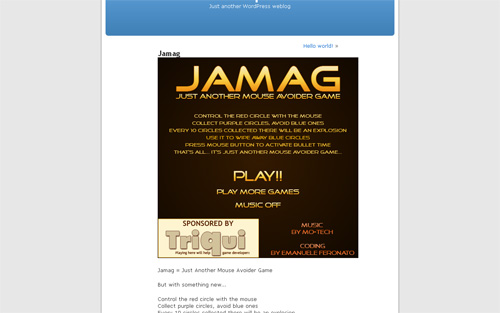
Now that’s how your post will look like:
We have our game embedded!!!!
In the same way we are going to edit index.php (the file that handles the blog main page) located at the same path, find this line
and just after it add
">
to add the thumbnail near the title
You index.php now is coded this way:
">
'); ?> Posted in |
Not Found
Sorry, but you are looking for something that isn't here.
and looks this way:
So we ended having a game listed in the blog.
During next step, we’ll automatically insert all 2000+ existing MochiAds games in the blog and check for new games every day.
Then, it’s “just” a matter of playing with theme configuration and css and we’ll have our WP arcade running!
To provide the best experiences, we use technologies like cookies to store and/or access device information. Consenting to these technologies will allow us to process data such as browsing behavior or unique IDs on this site. Not consenting or withdrawing consent, may adversely affect certain features and functions.
Functional
Always active
The technical storage or access is strictly necessary for the legitimate purpose of enabling the use of a specific service explicitly requested by the subscriber or user, or for the sole purpose of carrying out the transmission of a communication over an electronic communications network.
Preferences
The technical storage or access is necessary for the legitimate purpose of storing preferences that are not requested by the subscriber or user.
Statistics
The technical storage or access that is used exclusively for statistical purposes.The technical storage or access that is used exclusively for anonymous statistical purposes. Without a subpoena, voluntary compliance on the part of your Internet Service Provider, or additional records from a third party, information stored or retrieved for this purpose alone cannot usually be used to identify you.
Marketing
The technical storage or access is required to create user profiles to send advertising, or to track the user on a website or across several websites for similar marketing purposes.


 ">
">